SIGNAL ACTIVE
SAVORY_DESIGNS.OS
00:00:00

> ls ./projects/


I wanted a desk display that runs itself off my home WiFi, so I built one around the ESP32 and wrote firmware that pulls from a few free APIs. I've always been into aviation, so I leaned into that. Left to right it's three round screens: an old-school radar tracking planes overhead, a clock with military jets for hands, and a weather display with a different animation for each kind of weather.

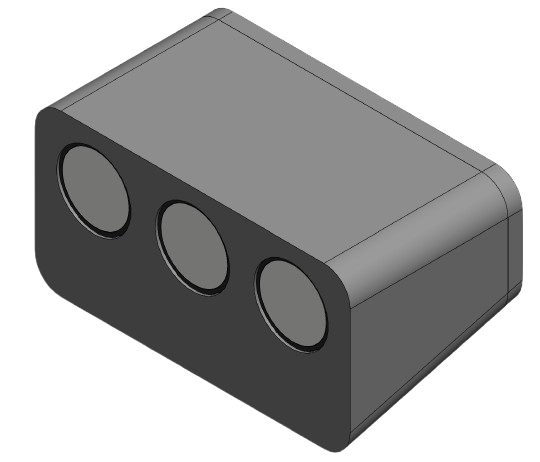
Aviation Desk Display — SolidWorks isometric section

CAD — ISOMETRIC VIEW

Isometric section in SolidWorks. The housing holds all three displays and their three ESP32-C3s. The tolerancing was the real work: the boards can't rattle when you move the unit, the displays snap in without cracking, and the back snaps on but still pops off when I want to reflash.

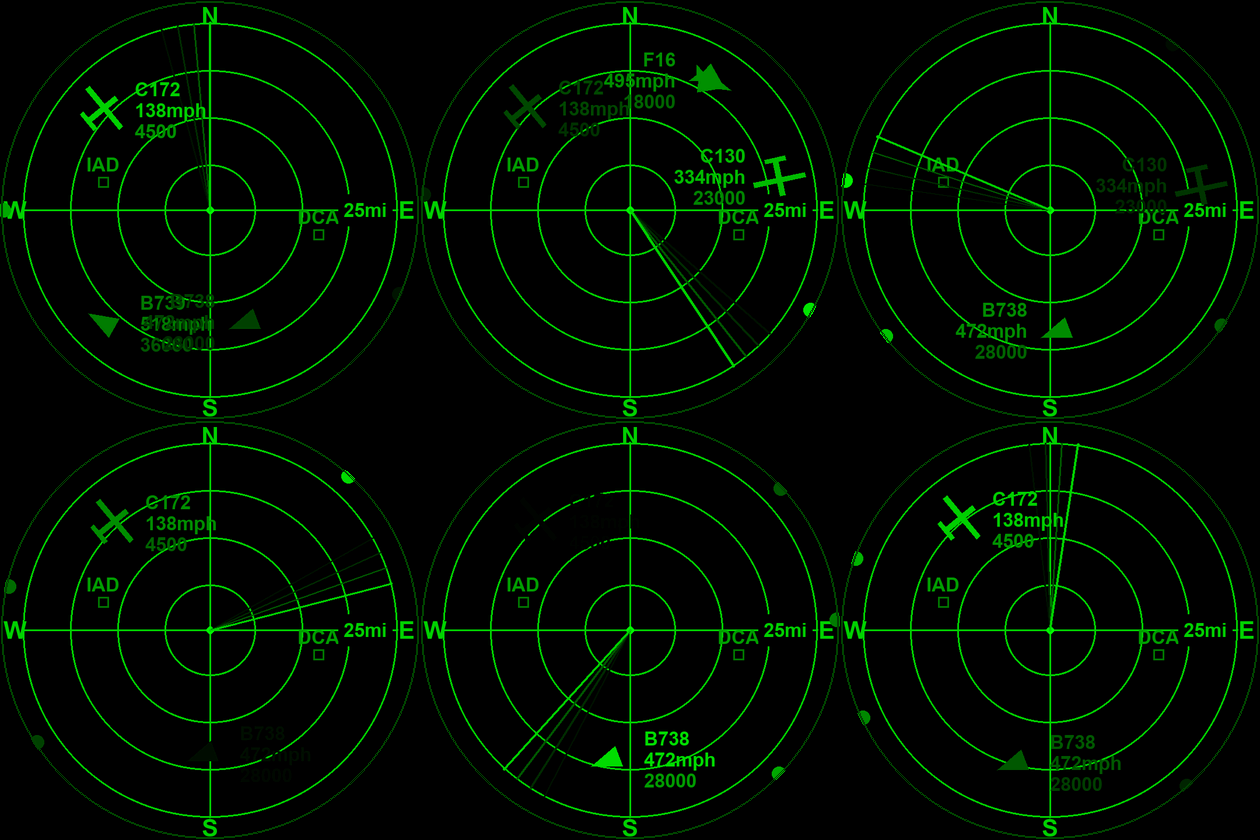
Radar display — rotating arm tracking aircraft overhead

RADAR DISPLAY

Based on old-fashioned radar scopes, with a rotating arm that updates the positions of planes overhead. I live near two major airports, so there's always traffic to show, and military aircraft — rare around here — get their own custom symbols as an easter egg if one ever passes by. It pulls live aircraft positions from adsb.fi, a free, community-run ADS-B aggregator.

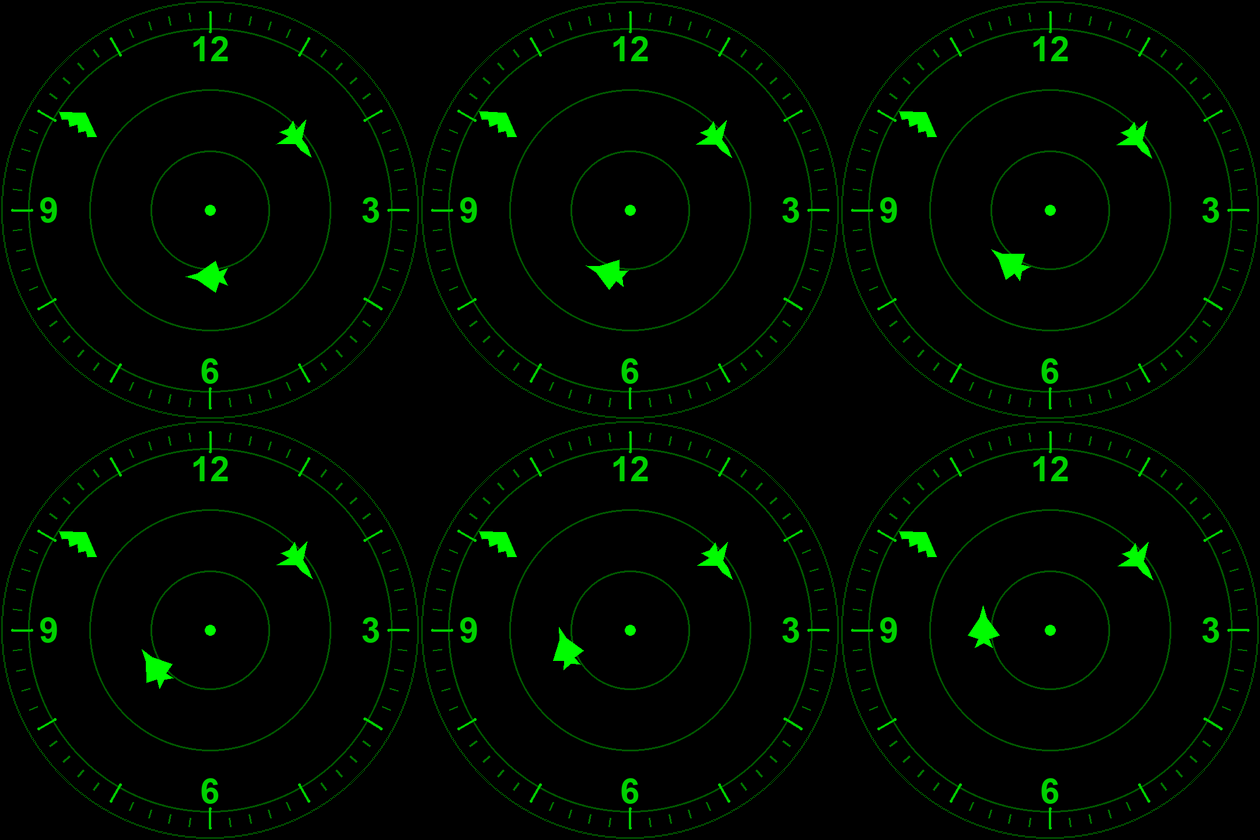
Clock display — military aircraft as the hands

CLOCK DISPLAY

Themed to match the radar, with aircraft as the hands: an F-22 Raptor for the seconds, a B-1 bomber for the minutes, and a B-2 bomber for the hours. The hands stay synced over NTP (Network Time Protocol), the standard internet time-sync protocol.

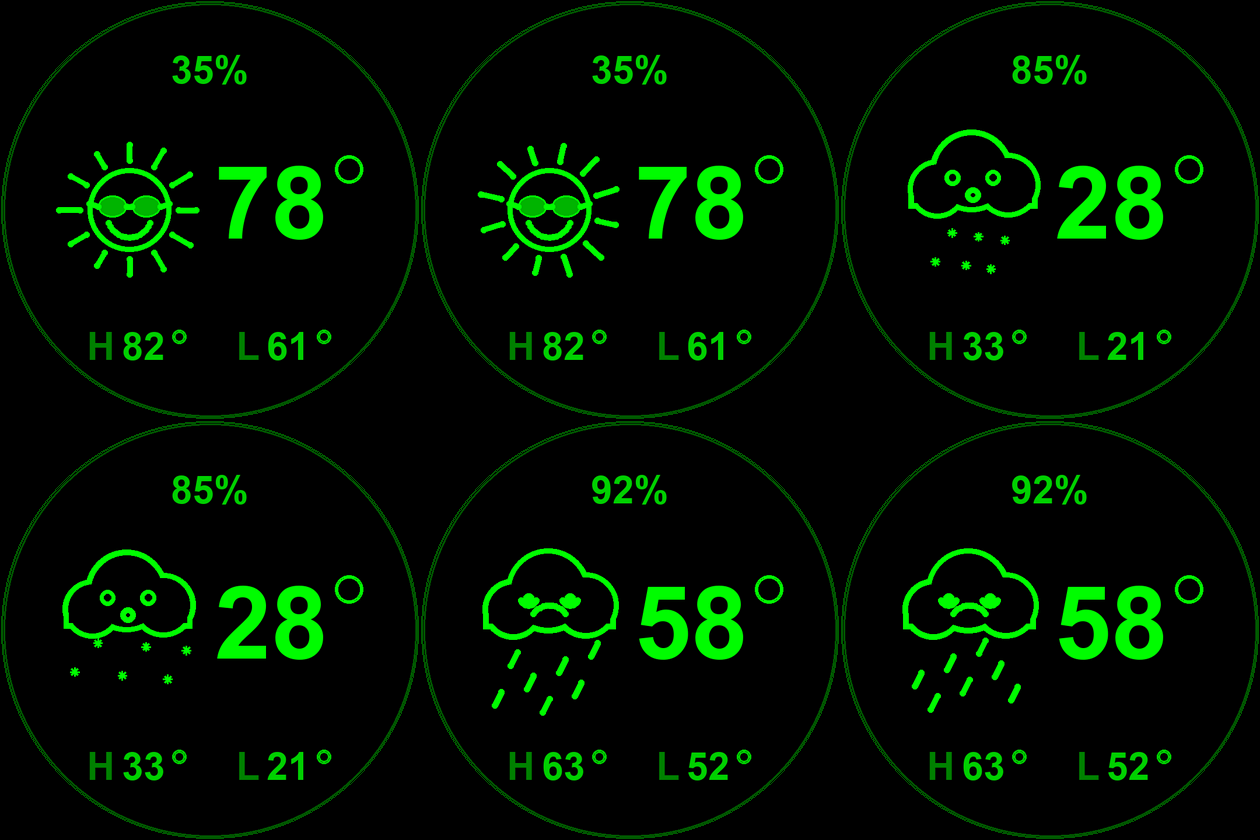
Weather display with animated conditions

WEATHER DISPLAY

The fun one. Each weather type gets its own animation next to the data: humidity, current temperature, and the day's high and low. Synced to Open-Meteo, a free weather API.

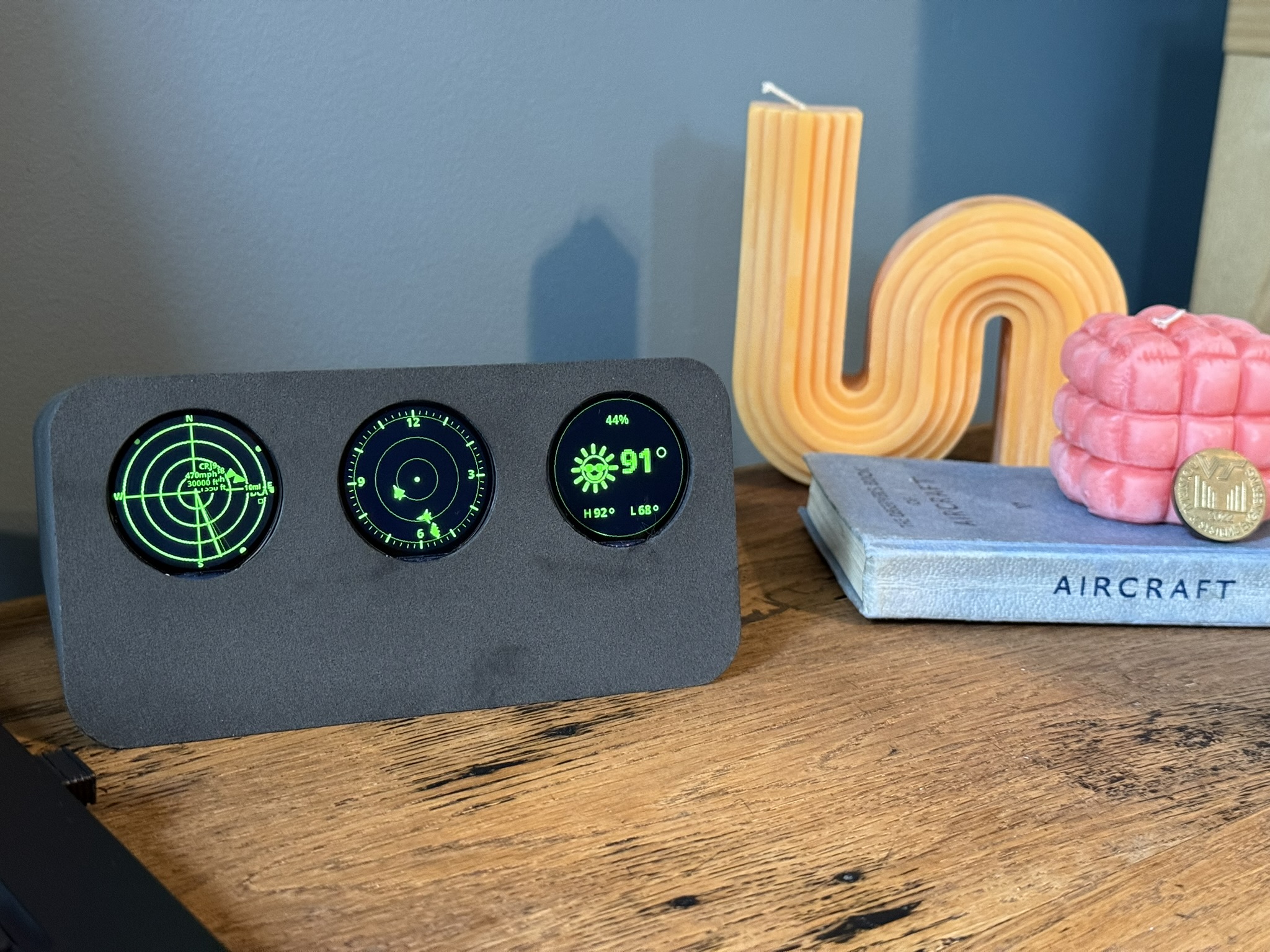
Aviation Desk Display assembled and running

IN ACTION

It came out great. Every tolerance worked and the whole thing assembles with no glue. The case is SLS-printed and runs off a single USB cable to the wall. Full project is open source on my GitHub.

DESIGN DECISION

Three displays, three ESP32-C3s — one per screen — instead of a single controller running all of them. Driving three SPI displays and three API pollers off one chip would have meant constant juggling, and any hang would freeze the whole unit. At a couple of dollars a board, giving each display its own brain was cheaper in effort than it was in money: the radar, clock, and weather screens run, fail, and reflash on their own, and the firmware for each stays small enough that I can actually keep it all in my head. The case follows the same idea, with a back that snaps off so I can pull any one board without taking the whole thing apart.

TAGS: ESP32, Firmware Development, SPI/I2C/UART, Assembly Design, Rapid Prototyping

A small desk clock I designed start to finish in Altium — schematic and PCB both mine. The open-source DIGIduino watch was a loose inspiration, not a starting point; I didn't reuse any of its files. It actually started life as a coin-cell wristwatch and turned into a desk clock partway through layout, once the display I wanted and the circular board size stopped making sense on a wrist. It's an ATmega328P with a PCF8563 RTC on a 4-layer, all-SMD board, sitting in a clear SLA case that makes the bare PCB the whole look.

The design is done — schematic, layout, and fab-ready files all finished — and I sent it to PCBWay for a quote. It came back higher than I want to spend on a personal piece right now, mostly from the 4-layer stackup and the fine drill sizes, so it's parked at the design stage. Everything's ready to build the day I decide it's worth it.

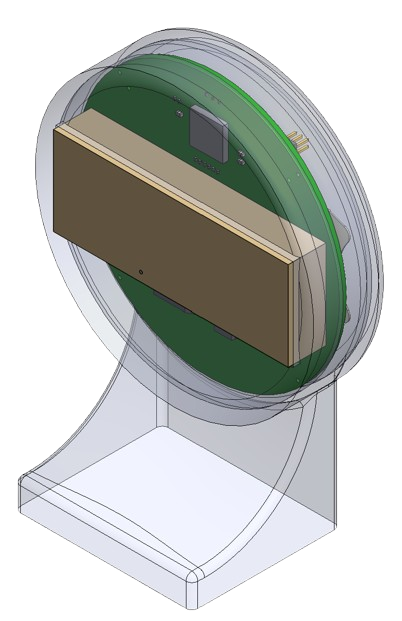
Timepiece — isometric section of the clear SLA housing

CAD — ISOMETRIC VIEW

Isometric section in SolidWorks. The clear SLA housing exposes the PCB and display as the aesthetic, sitting on a swept stand that angles the face toward the viewer. The board is constrained by a lip matched to its outline — no fasteners, the display bezel acts as the retention feature.

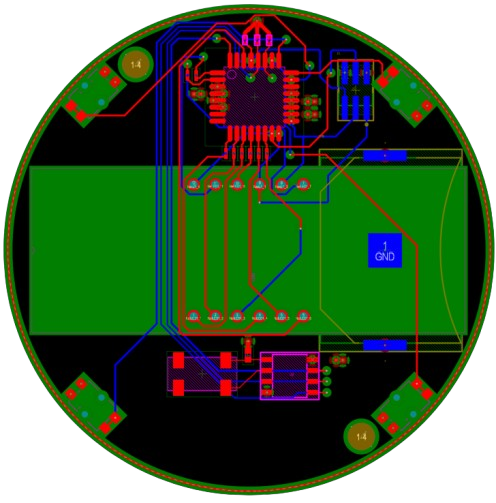
Timepiece — 4-layer PCB layout, circular form factor

PCB — LAYOUT

4-layer FR-4 on a circular outline with dedicated GND/VCC planes. Display anchored to the top face; the RTC crystal kept within 3mm of the oscillator pins on its own net class.

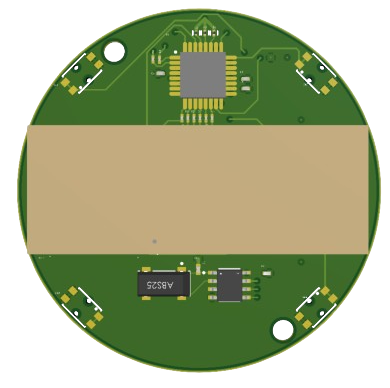
Timepiece — 3D render, component side

PCB — TOP RENDER

3D render, component side — all SMD, silkscreen intentionally omitted for a clean bare-board look through the clear resin.

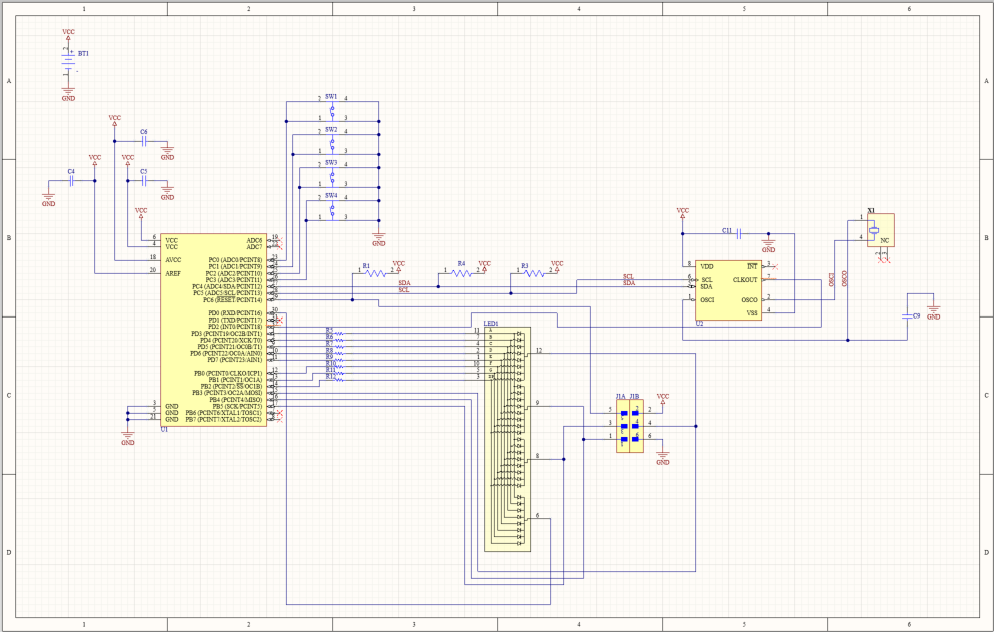
Timepiece — full system schematic, Altium Designer

SCHEMATIC

Full system schematic in Altium — ATmega328P, PCF8563 RTC on a 32.768kHz crystal, multiplexed 4-digit 7-segment display, and an ISP header at the board edge.

DESIGN DECISION

Two calls defined this one. The first was letting the form factor change the project: I set out to build a wristwatch, but the display and the round board never sat comfortably on a wrist, so I stopped forcing it and made it a desk clock instead. The second was deciding not to build it. When the PCBWay quote came back, the 4-layer board with sub-0.2mm drills and assembly cost more than the piece was worth to me as a personal project. The engineering was the point, and that's finished — paying to fab it wasn't worth it. Walking away from a design you've already sunk time into is a harder call than it sounds, and I'd rather make it on purpose than out of momentum.

TAGS: Altium Designer, SolidWorks, PCB Layout, SLA/Resin Printing, Firmware Development

A local-first desktop and CLI tool that turns an exported medical record — CCDA XML, an EHR visit-summary PDF, or Apple Health JSON — into a plain-language health report. You can pull your own records from portals like MyChart or athenaHealth, but they come out dense, clinical, and full of names, birth dates, MRNs, addresses, and provider info. Pasting that into a chatbot is a privacy mess. This tool makes the "let an LLM explain my labs" idea safe to actually do.

At its core is a three-stage scrub. First, identifying fields get stripped as the file is parsed — a birth date, say, collapses to just a decade. Then regex clears SSNs, phone numbers, emails, and MRNs. Finally a spaCy NER pass picks up any names or organizations the first two missed. PDFs were the hard part: EHR exports lay names out in multi-column tables that get shredded during text extraction, so instead of scrubbing strings I pull every word with its x/y position and drop everything to the right of the PII columns. Only the de-identified version moves downstream, never the raw file.

Right before the one call to the Claude API, you see exactly what's about to be sent and you can edit it. The same core runs both a Tkinter desktop app and a CLI, with parsing, scrubbing, and the API call on background threads so nothing freezes. It's Python — lxml, pdfplumber, spaCy, and the Anthropic SDK — and it all runs locally; nothing identifying gets committed or sent without a look first. Open source on my GitHub.

Screenshots use sample data — no real medical records.

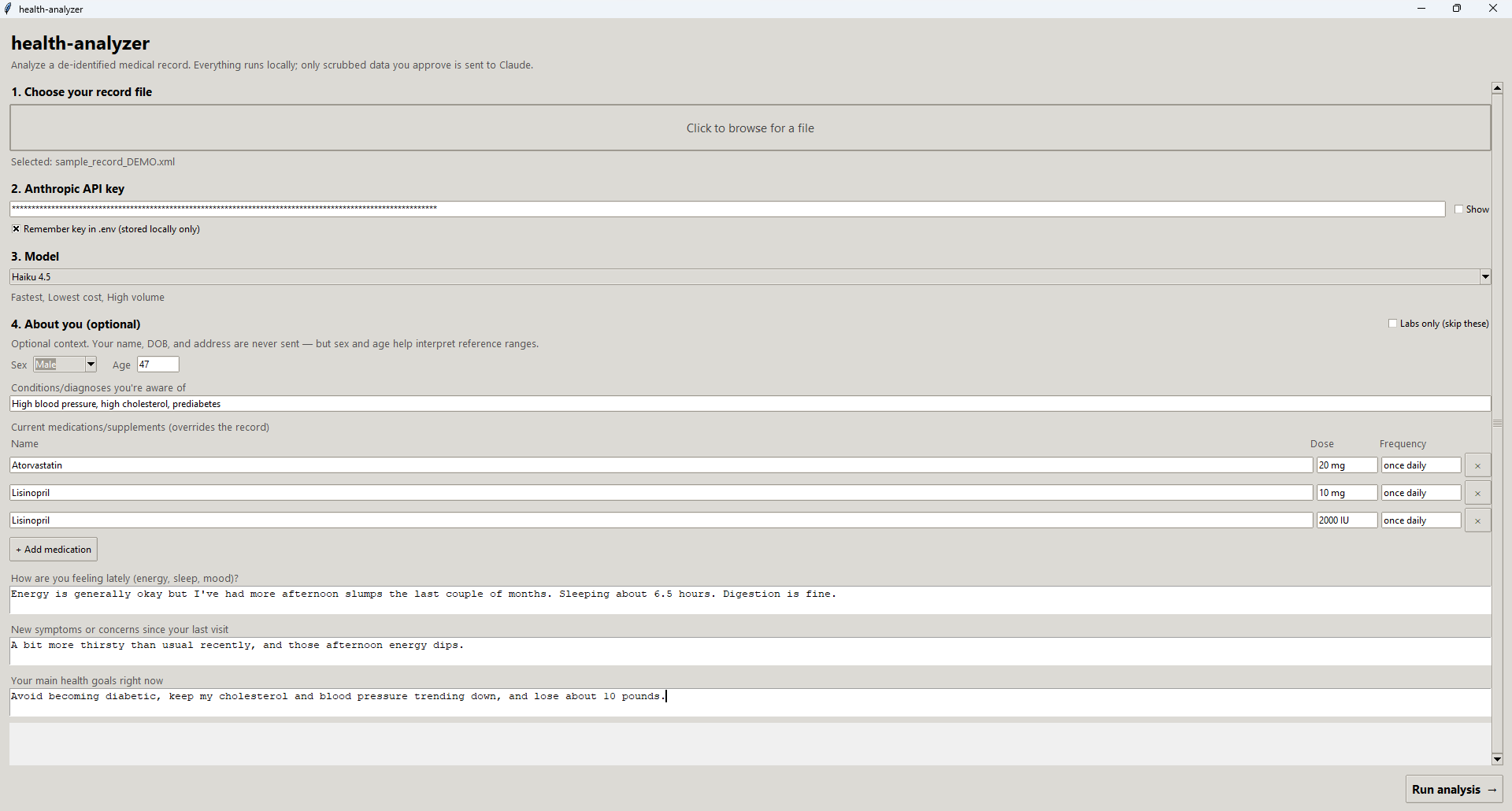
Medical History Tool — desktop home / intake screen

DESKTOP APP — HOME

The home screen of the desktop wizard: drop in a record, set the API key and model, and optionally add structured intake — current medications, conditions, and goals.

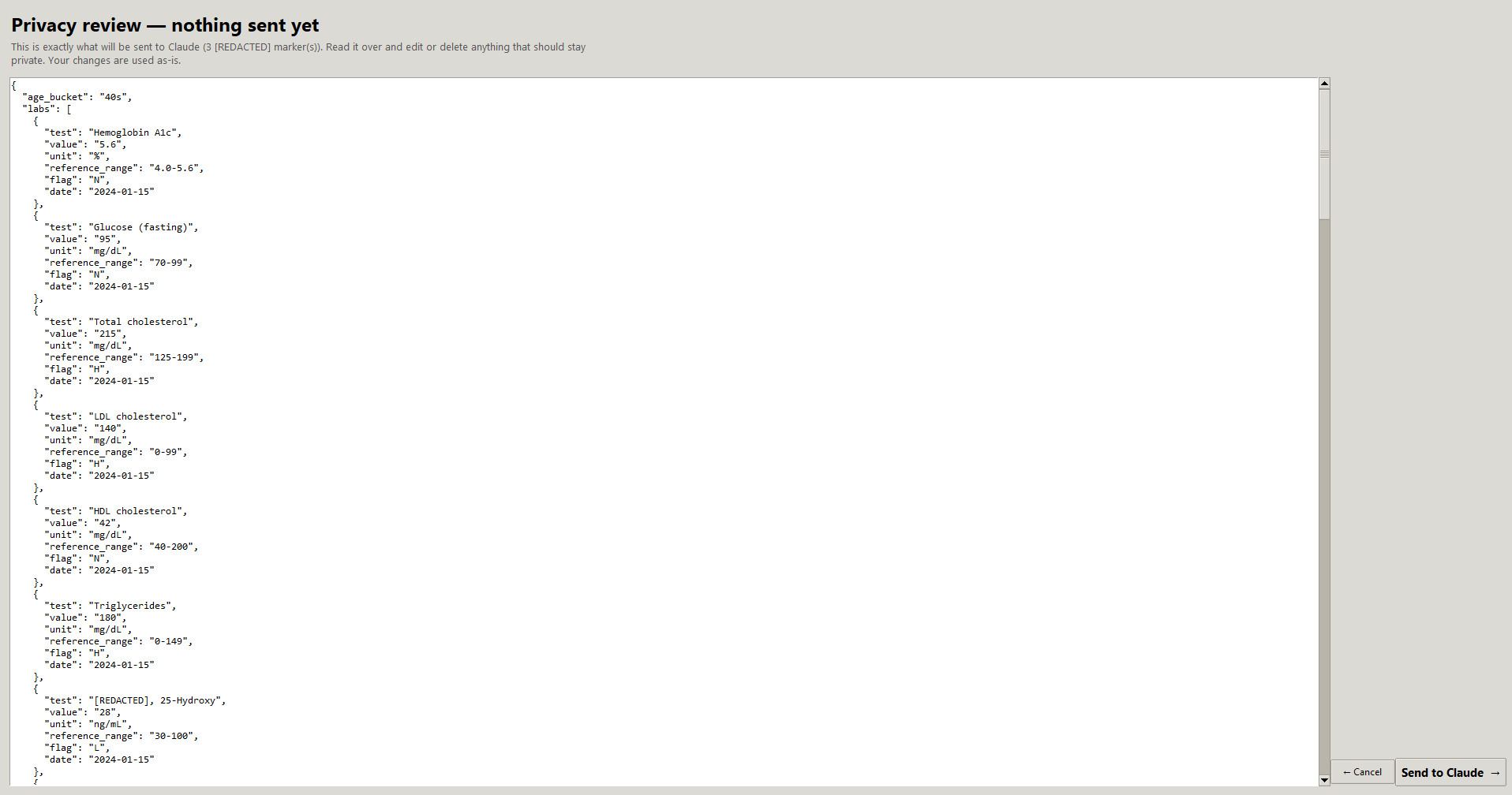
Medical History Tool — editable privacy review screen

PRIVACY REVIEW

The privacy gate — the exact de-identified text that will be sent, editable in-app, with a redaction count and a Send / Cancel choice. Nothing leaves the machine until this step.

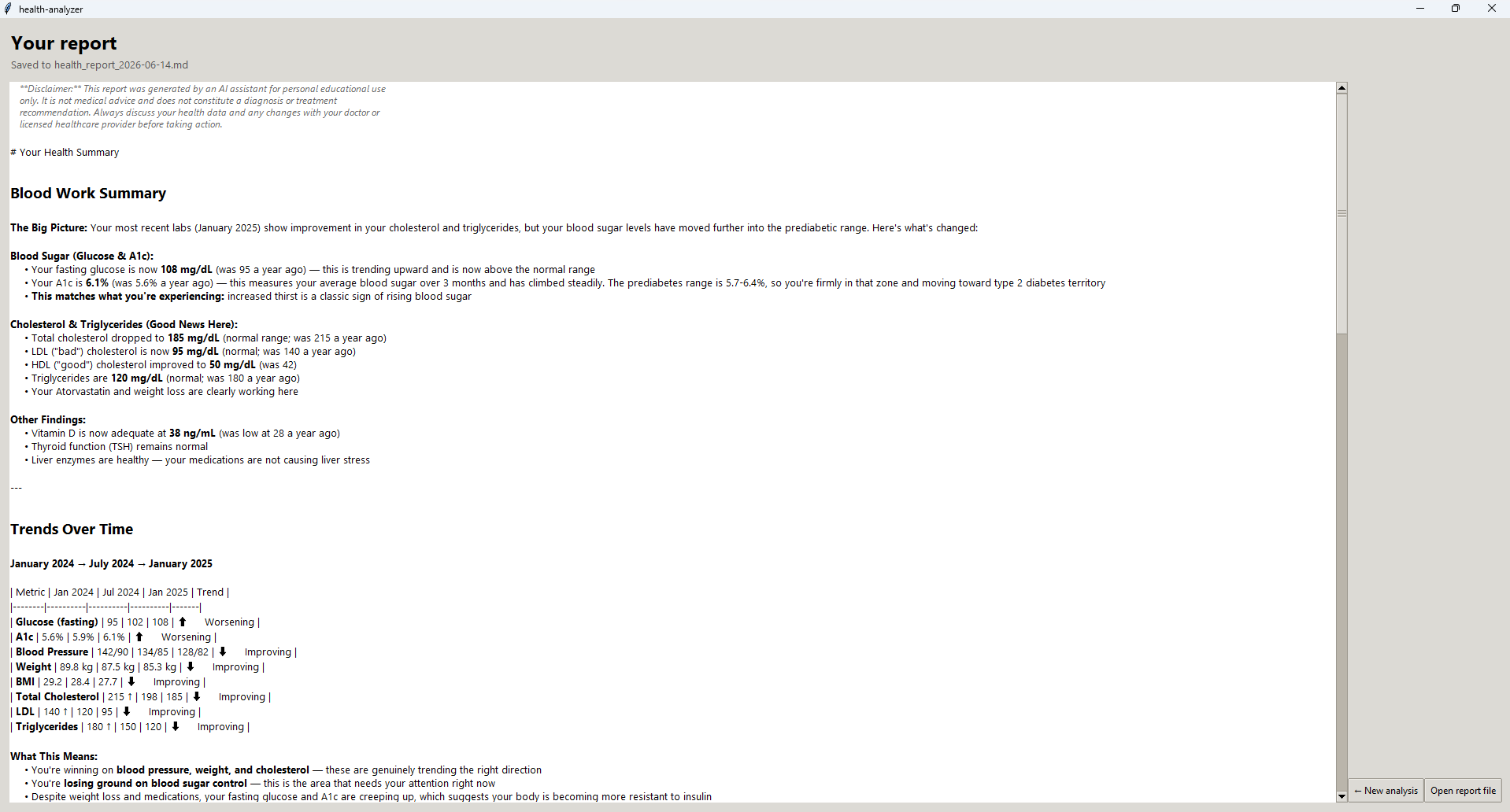
Medical History Tool — rendered health report

REPORT

The rendered report — plain-language sections (blood work summary, trends, things to watch, questions to ask your doctor) generated from the de-identified data, with a medical disclaimer.

DESIGN DECISION

The real question wasn't how to analyze a record — it was where that analysis should run. I had three options: a local rules engine with no AI, a local LLM through something like Ollama, or a cloud API like Claude. A rules engine is private and free, but it can only compare numbers to reference ranges and print canned text; it can't connect a lab trend to a symptom or weigh a value against your own history, which is the part that makes the report worth reading. A local LLM keeps everything on-device, but the models that run on a normal machine are noticeably worse at clinical reasoning, and a confident wrong answer about your health is expensive.

So I went with the cloud API and treated the privacy cost as something to engineer around, not a reason to settle for a weaker model. The PII is gone before anything leaves the machine, and you approve the exact payload first. Under the commercial API terms that data isn't used for training. I'm upfront about the catch, though: a keyed request is still tied to my account, so de-identification protects the contents but doesn't make the request anonymous to the provider. That's why the LLM sits behind a single analyzer interface — Claude is the default, not a lock-in, and a fully offline backend could drop in for anyone who needs nothing to leave their device at all.

TAGS: Python, Anthropic / Claude API, PII / PHI De-identification, NLP (spaCy), Tkinter GUI

A local, private desktop app that replaces a year of Excel budgeting and adds the thing the spreadsheet never did: net worth over time. It's a native app on top of a local SQLite database — nothing hosted, no account, and the financial data never leaves my machine. The old workbook (transaction logs, biweekly paychecks, salary history) imports in one pass, and a reconciliation report checks each month's imported total against the spreadsheet's own number instead of quietly papering over any gaps.

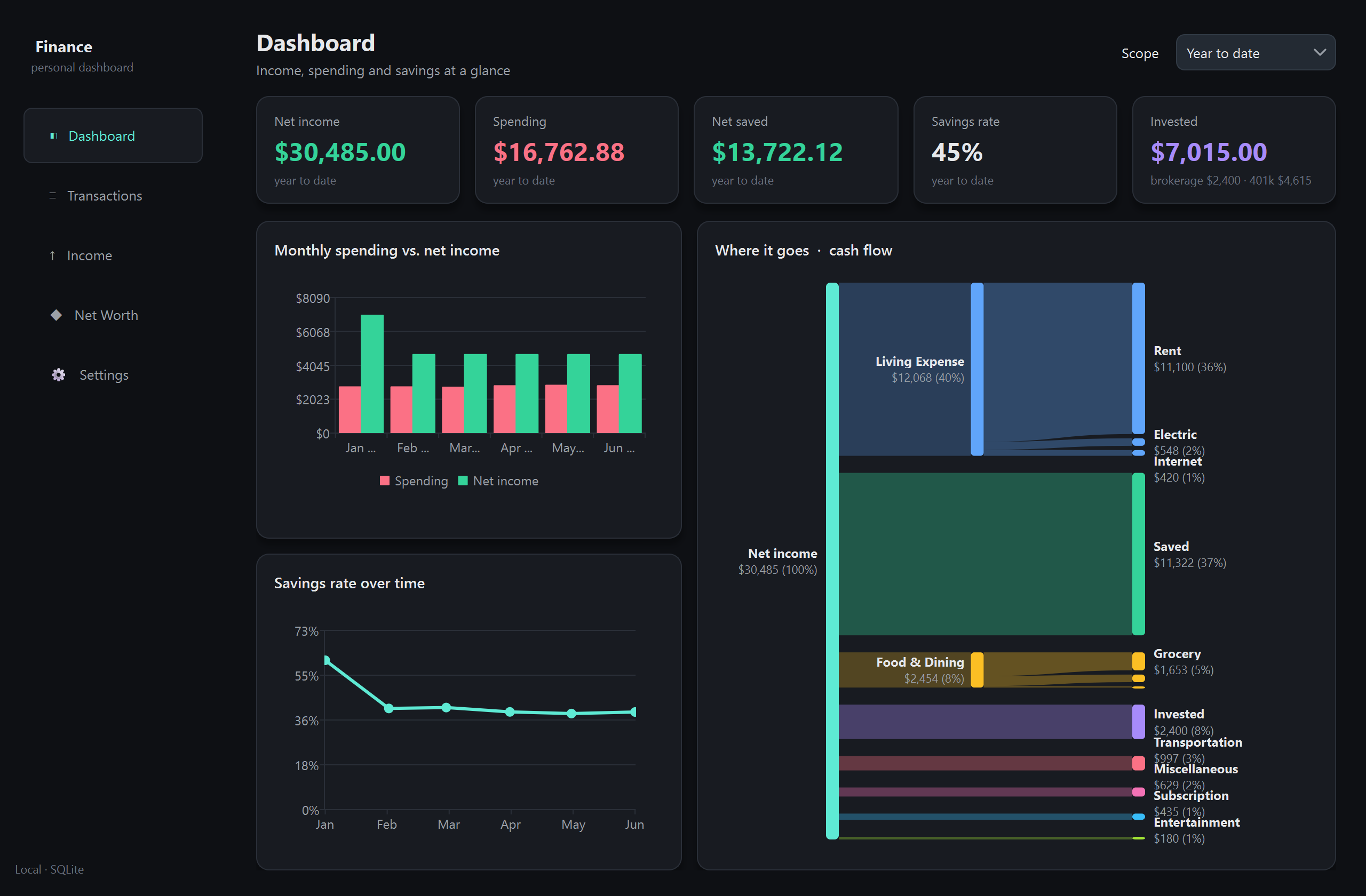
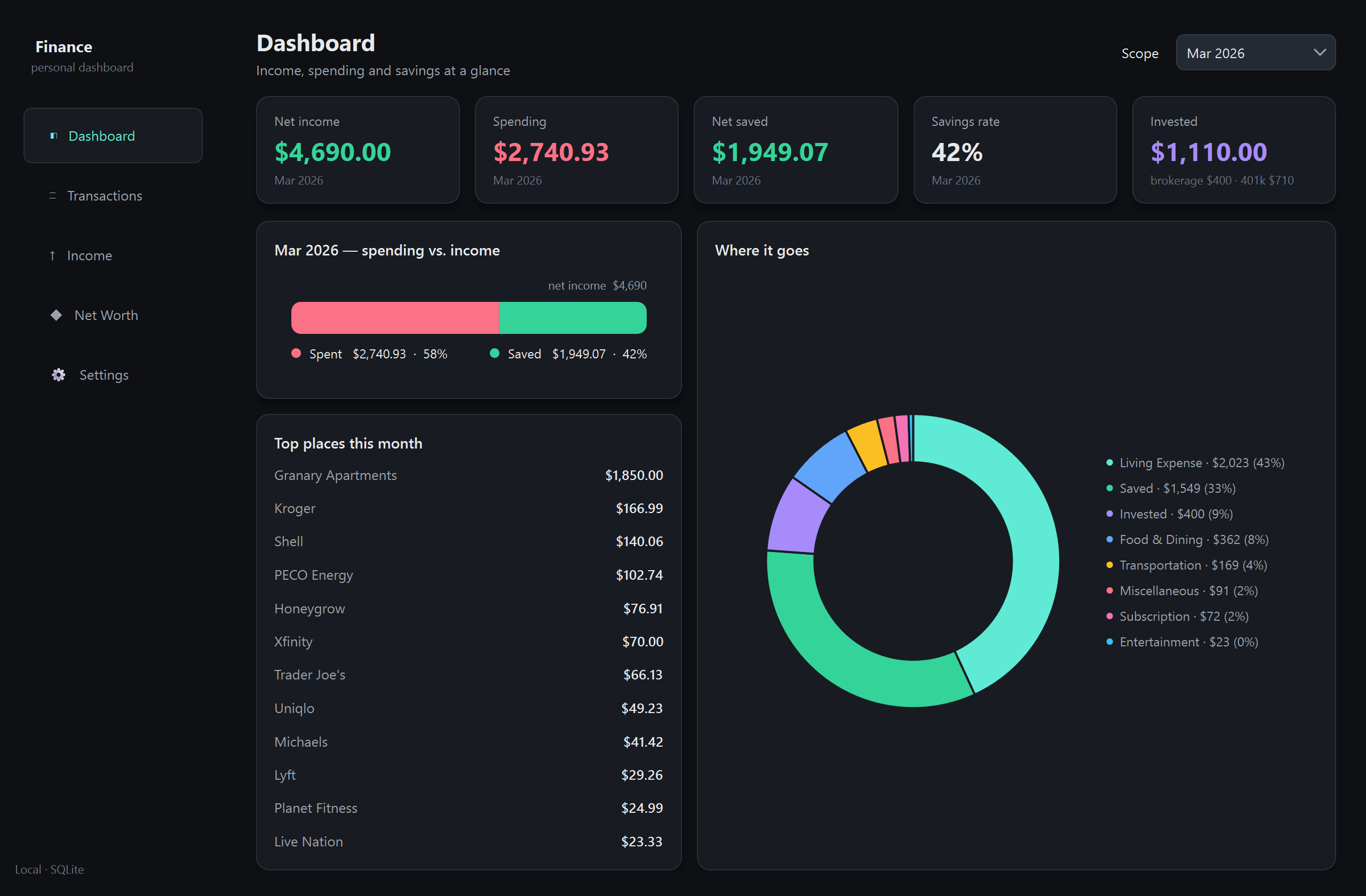
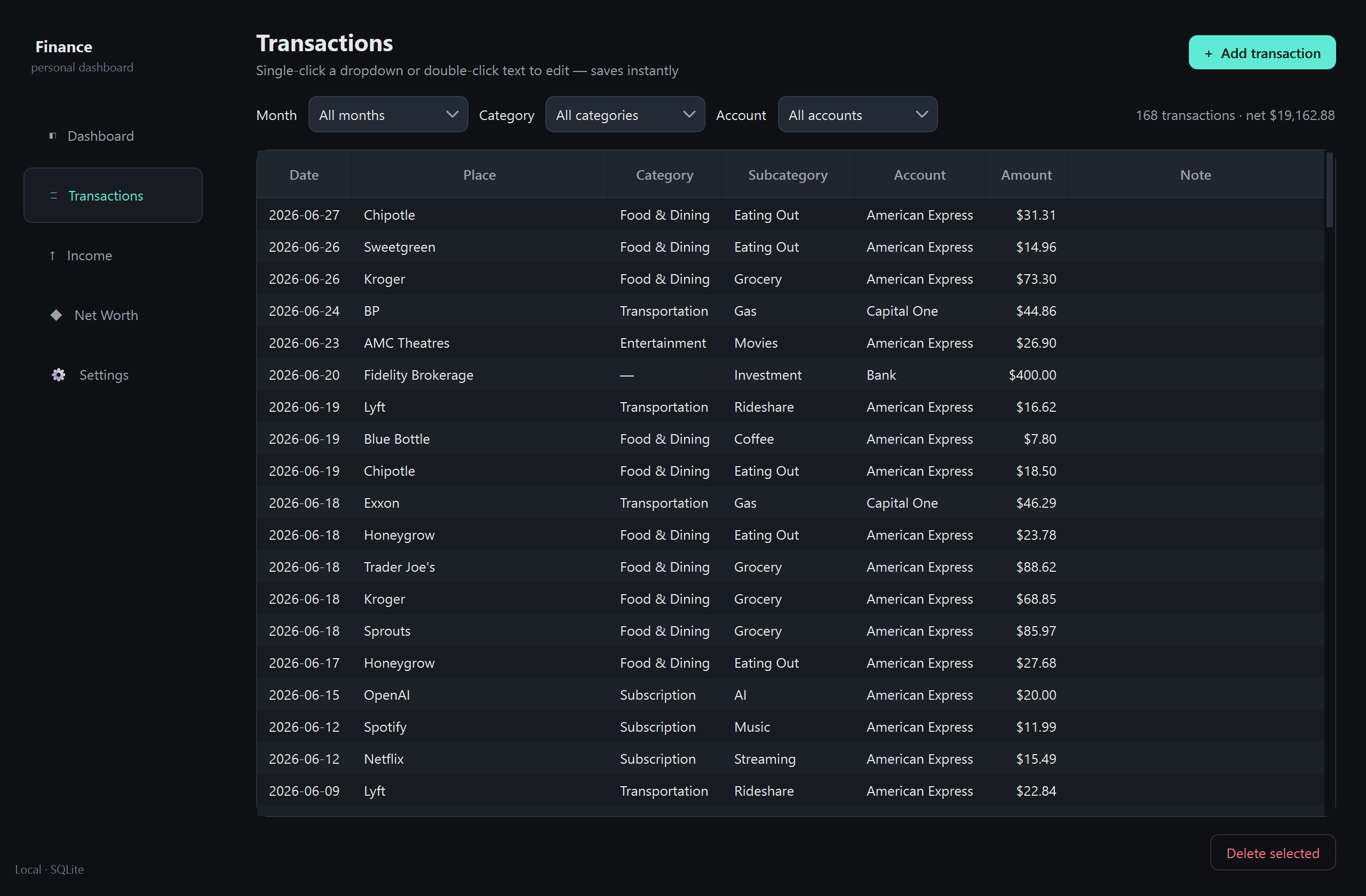
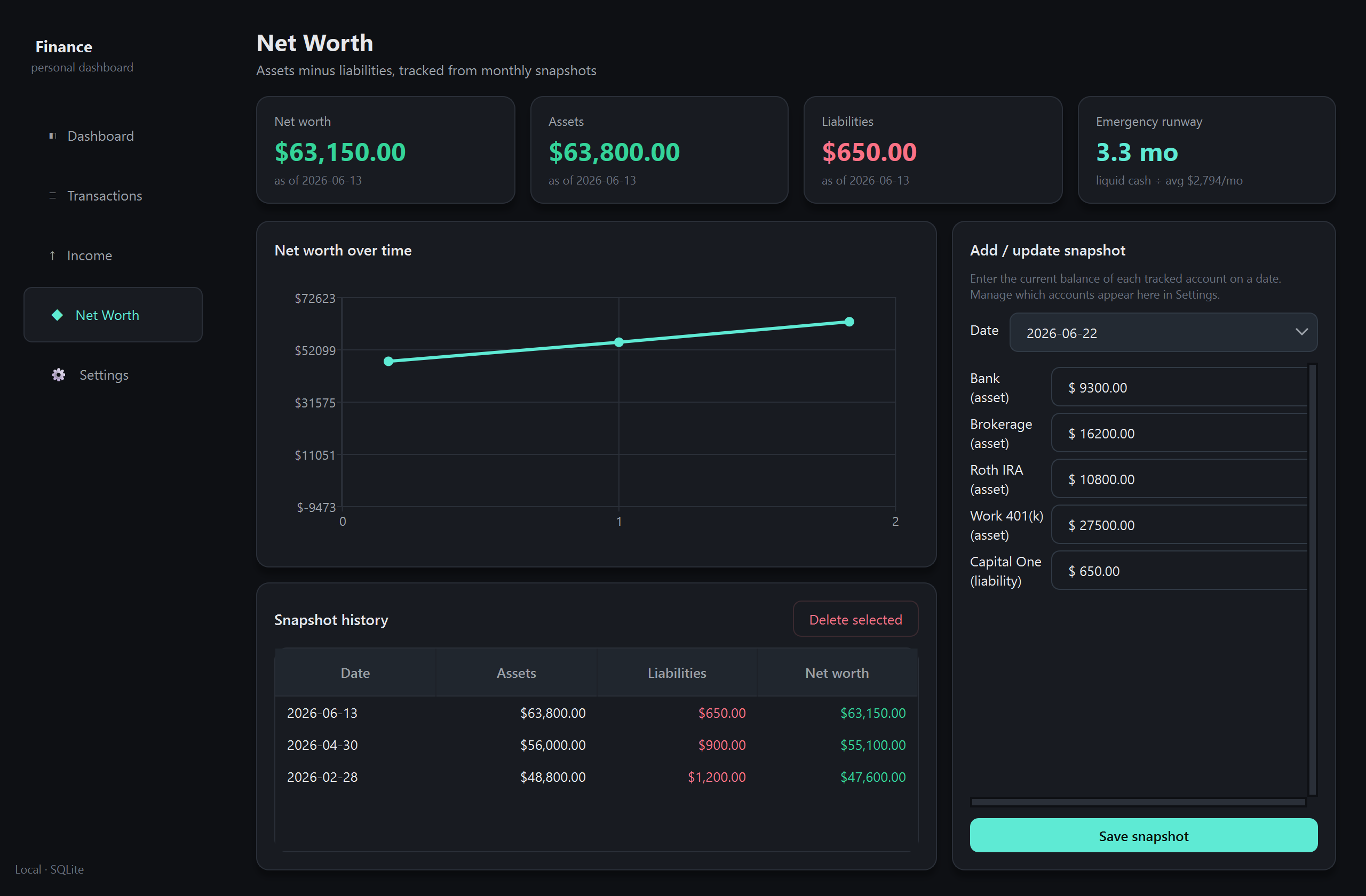
The dashboard turns the ledger into a picture of where the money actually goes: KPI cards, spending against income, a savings-rate trend, and a three-tier cash-flow Sankey. QtCharts doesn't have a Sankey, so I drew it by hand with cubic-ribbon paths and a few rules that keep the labels from overlapping. Transactions live in an inline-editable table with place→category auto-fill, plus a CSV round-trip for re-categorizing a whole month at once. On top of the ledger it tracks net worth from account snapshots, an emergency-fund runway, and recurring paychecks. Built with PyQt6, QtCharts, and openpyxl over SQLite, with the database and source spreadsheet git-ignored so nothing personal ends up in version control.

Screenshots use sample data — no real financial figures.

Personal Finance Dashboard — year-to-date dashboard with cash-flow Sankey

DASHBOARD — WHERE IT GOES

The year-to-date view: spending, income, net saved and savings rate up top; month-to-month bars and a savings-rate trend on the left; and the three-tier cash-flow Sankey on the right, tracing net income out to individual categories.

Personal Finance Dashboard — single-month view with donut and top places

SINGLE MONTH

Scoped to one month: a horizontal spent-vs-saved bar, a category donut, and the month's top places — the same data, re-shaped for a single period.

Personal Finance Dashboard — inline-editable transactions ledger

TRANSACTIONS

The ledger — an inline-editable table where clicking a cell changes the category, account or amount and saves instantly, with place→category auto-fill learned from past entries.

Personal Finance Dashboard — net worth over time from account snapshots

NET WORTH

Net worth from periodic account snapshots — assets minus liabilities over time, plus an emergency-fund runway measured in months of average spending.

DESIGN DECISION

This is some of the most sensitive data I own, so I started from one rule: it never leaves the machine. That immediately ruled out a hosted app, sync, or a cloud database, and pointed at a native desktop app over a local SQLite file — with the database and source spreadsheet git-ignored so they can't be committed by accident. With no server to fall back on, every chart had to stand on its own, which is why the cash-flow Sankey is painted directly with Qt's 2D painter instead of pulling in a heavy charting library. The whole thing stays a single local process with nothing to leak.

TAGS: Python, PyQt6, QtCharts, SQLite, Custom QPainter Data-Viz, openpyxl, Data Migration

A daily news email I actually want to read. Every morning at 6:30 it researches the topics I care about, has Claude rank and rewrite it all down to what's actually relevant to me, and sends a clean brief to my inbox — one tailored page instead of ten open tabs. It's the same idea as a newsletter, except the "editor" is a model that knows what I'm into and the whole thing is built and run by me.

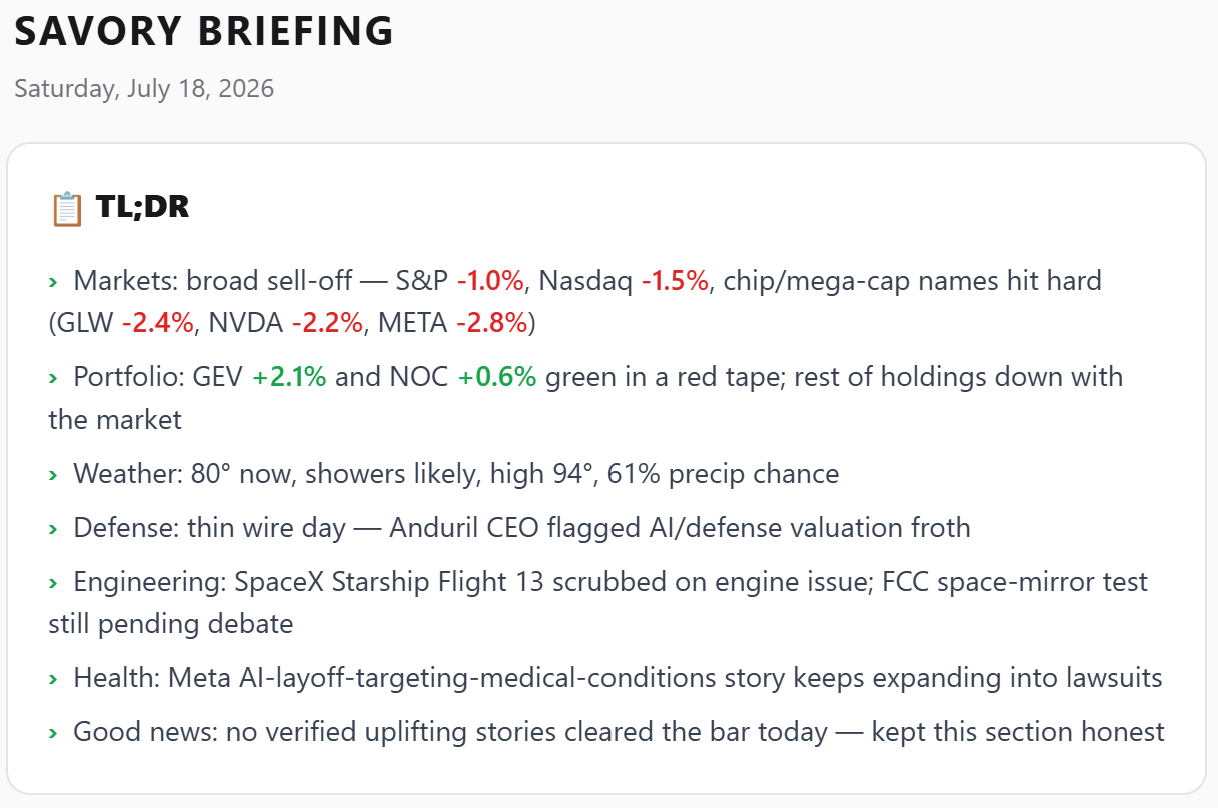
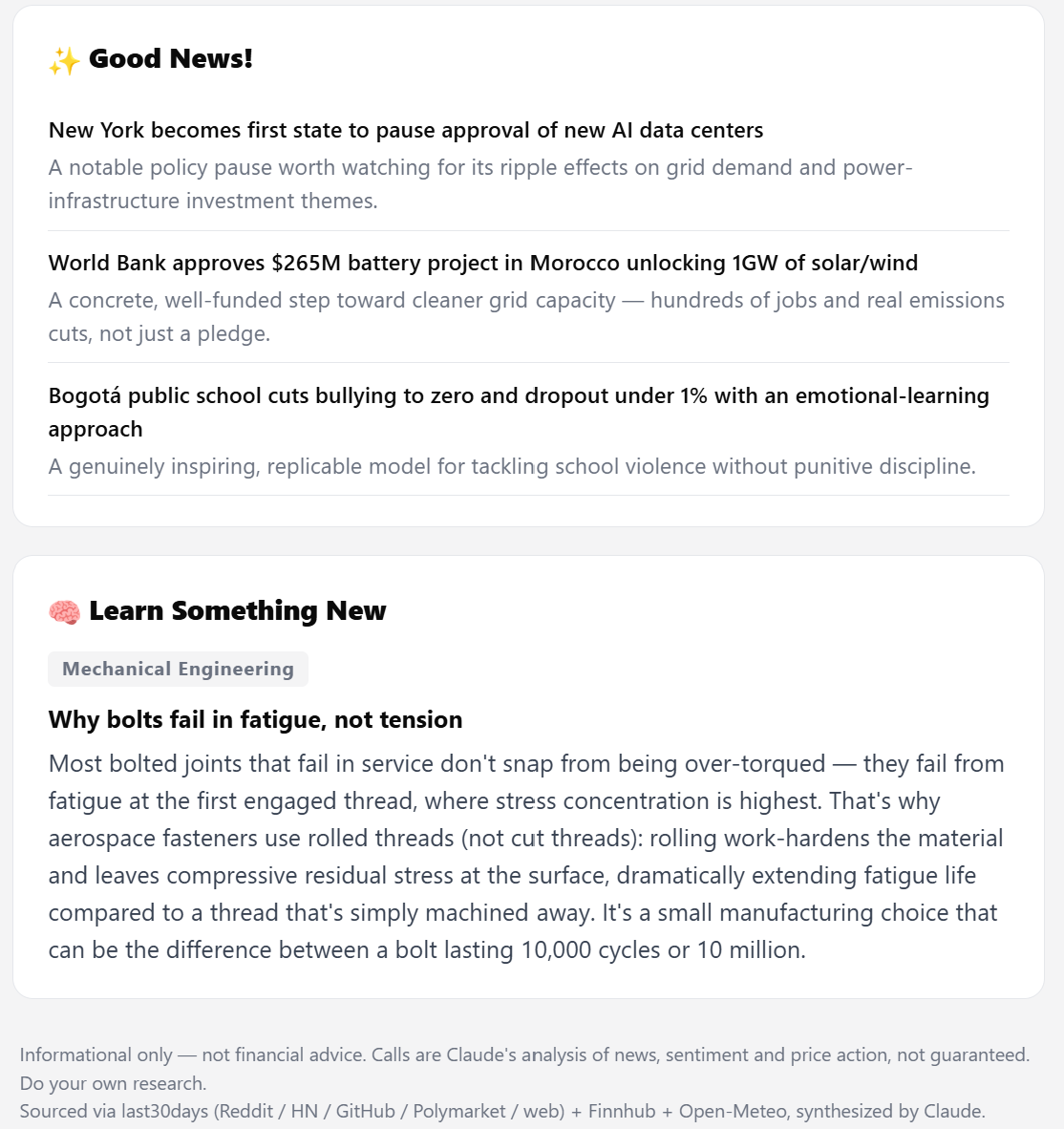
It opens with a TL;DR I can scan in twenty seconds, then walks through Local Weather, Defense, Engineering (space, robotics, consumer hardware), US and Global news, my Markets & Portfolio, Health, and a Good News closer — and ends on a small "Learn Something New" fact. The markets section is the one I lean on most: it gives a BUY / SELL / HOLD call on each stock I own, plus a short watchlist of names worth a look, each grounded in the day's price action and sentiment — with a clear "informational, not financial advice" disclaimer on every send.

Under the hood it's a small Python pipeline. It pulls the day's chatter from Reddit, Hacker News, and the web, live quotes from a market-data API, and weather from Open-Meteo, then hands all of it to Claude with a strict output format so the model ranks and writes but my own template controls the look. It emails through Resend, archives every issue, and — after a detour I'll get to below — now runs on a cloud schedule so it lands every morning whether my machine is on or not.

Savory Briefing email — header and TL;DR with color-coded stock moves

THE TL;DR

The top of the email. Five to seven bullets I can read in about twenty seconds, with the day's stock moves color-coded — green for up, red for down — so I get the shape of the day before deciding what's worth reading in full.

Savory Briefing email — Good News section and a Learn Something New fact

GOOD NEWS + LEARN SOMETHING NEW

How every brief ends. A short Good News section so it doesn't close on the markets, and a rotating "Learn Something New" fact — a quick, minute-long bit of engineering, science, or history that changes each day.

DESIGN DECISION

The call I care about most is where the "intelligence" is allowed to act. I let the model do the ranking and the writing, but it never produces the final email — it returns structured data and my own template renders it, so the layout and the financial disclaimer are guaranteed every day no matter what the model decides to say. The other lesson was about reliability. I first ran it as a scheduled job on my own machine to keep things simple — no server, keys never leaving my desk. But a task that fires at 6:30am is useless if the computer is asleep, which mine was most mornings, and no amount of wake-timer coaxing made it dependable. So I moved the whole thing to a cloud schedule that runs on someone else's always-on servers and doesn't care whether my laptop is on. Simple-and-local lost to boring-and-always-on — the right call when the entire point is that it shows up every single morning.

TAGS: Python, Claude API, Structured LLM Output, News Aggregation, Finnhub, Cloud Scheduling

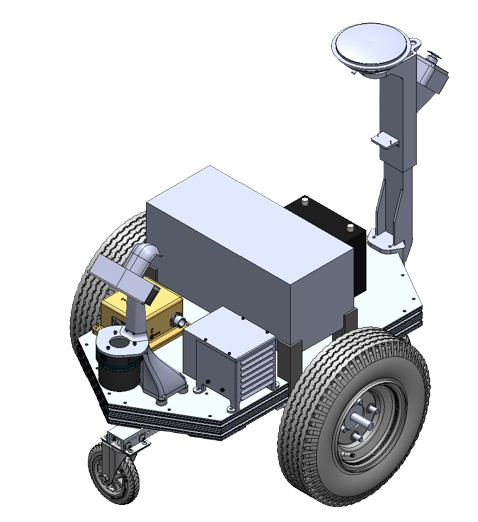
An autonomous ground vehicle we built from scratch for the Intelligent Ground Vehicle Competition (IGVC). It had to stay inside the course's boundary lines, hit GPS waypoints, and haul a 20-lb payload at up to 5 mph. I was on Team AutoNav's mechanical side, where I owned the chassis, the subassembly integration, and the structural platform that carried the whole sensor and electronics stack — including an air-spring caster suspension to keep terrain bumps from wrecking the sensor data.

Bowser — full vehicle CAD assembly, SolidWorks

CAD — ASSEMBLY

Full vehicle CAD assembly in SolidWorks — the structural platform sized to carry the complete sensor and electronics stack.

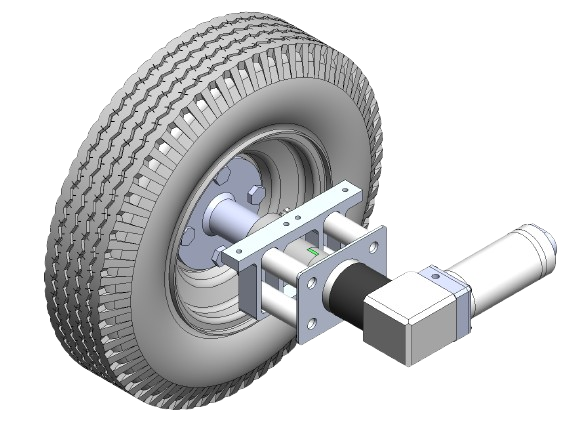
Bowser — powertrain subassembly

POWERTRAIN

Powertrain subassembly — motor, custom bracketry, and wheel hub, specced against the 20-lb payload and 5 mph requirement.

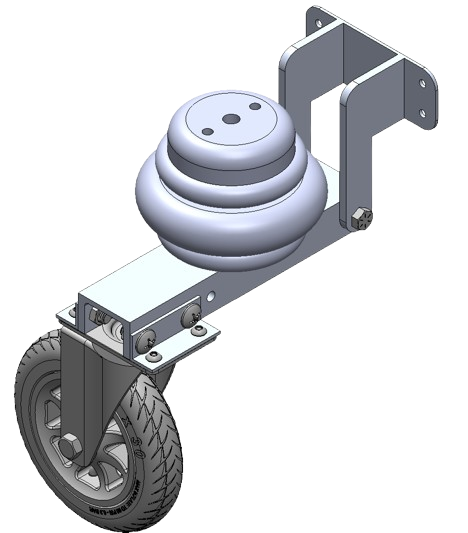
Bowser — caster wheel air-spring suspension

SUSPENSION

Caster-wheel suspension — an air spring on a lever arm to absorb impacts and damp the oscillations that would otherwise corrupt sensor data on outdoor terrain.

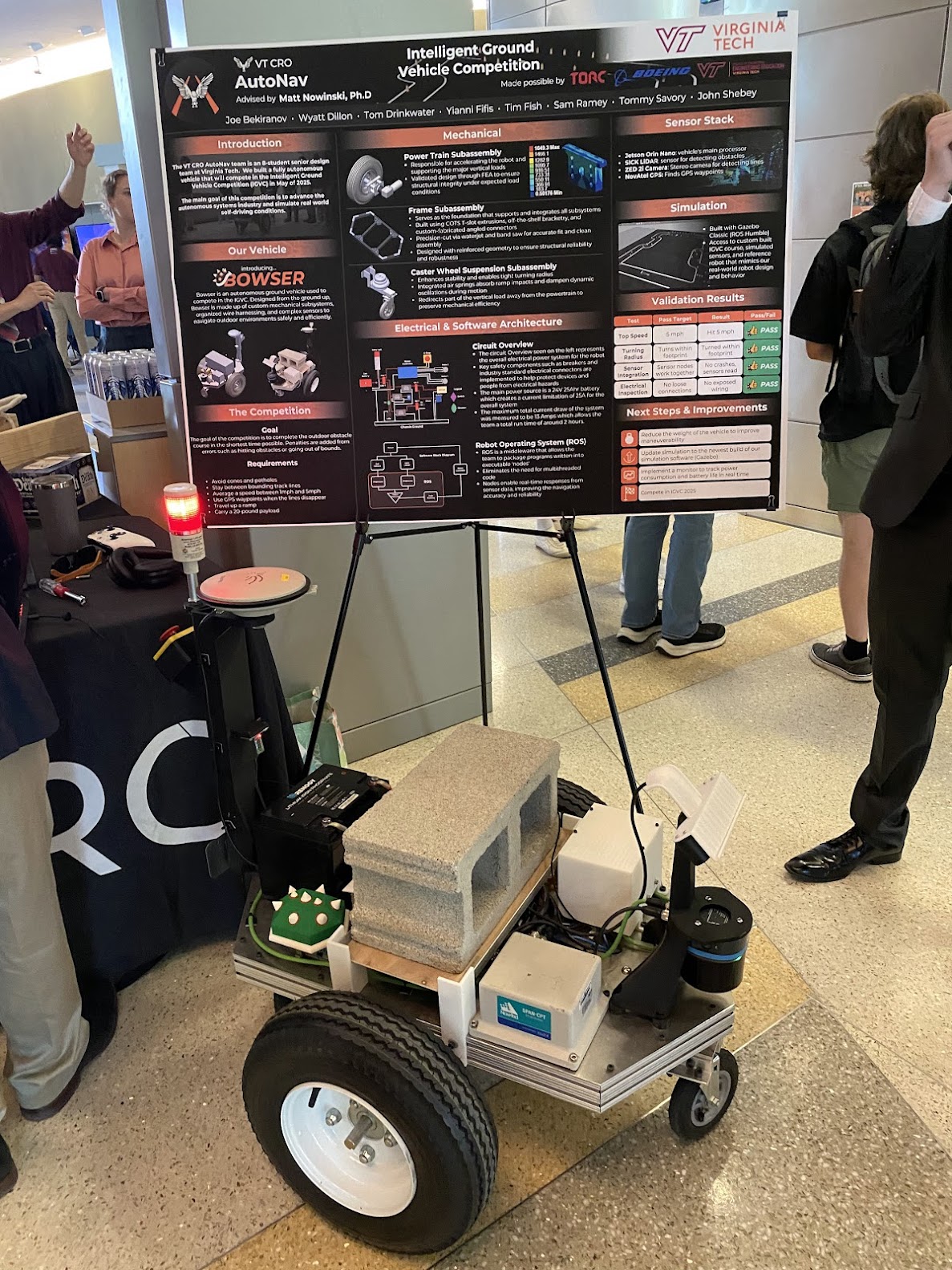
Bowser at the Virginia Tech IGVC senior design expo

FIELD — IGVC EXPO

Bowser at the Virginia Tech IGVC senior design expo — the first time every subsystem we'd tested separately ran together as one vehicle.

DESIGN DECISION

The suspension is the call I'm most proud of. An autonomous vehicle is only as good as its sensor data, and on grass and gravel a rigid frame passes every bump straight into the cameras, LiDAR, and IMU as noise. So I treated suspension as a data-quality problem, not a ride-comfort one: an air spring on a caster lever arm that absorbs the impacts and damps the oscillations before they reach the sensor platform. It added some weight and complexity, but clean sensor data is worth a lot to a vehicle that has to trust what it sees.

TAGS: SolidWorks, DFM, FEA, Rapid Prototyping, Systems Engineering, Technical Documentation

UNDER CONSTRUCTION — LIVE WORKSHOP LOG

A DIY heart-rate and running-cadence monitor built into a chest strap — my own take on a wearable fitness sensor. It logs each run to onboard flash and hands the data to a desktop app over USB, so reviewing a run is a deliberate sit-down rather than a glance at a phone. The goal is a compact, rechargeable pod that mounts to an elastic strap and captures both heart rate and running cadence from a single board, without buying a separate motion sensor.

The brain is a Seeed Studio XIAO nRF52840 Sense — a thumbnail-sized Nordic nRF52840 board with Bluetooth 5.0, an onboard 6-axis IMU (so cadence comes free from the same chip that does the computing), built-in LiPo charging, and a USB-C port for flashing and charging. Heart rate comes from a MAX30102 optical sensor — it shines red and infrared light into the skin and reads the reflection that changes with each pulse — wired to the XIAO over I²C. The whole stack runs off a small 3.7V LiPo and rides on an elastic chest strap, with the electronics living in a custom enclosure I'm designing in CAD — a clean, removable pod rather than tape-and-strap, which my mechanical-design background makes the easy part.

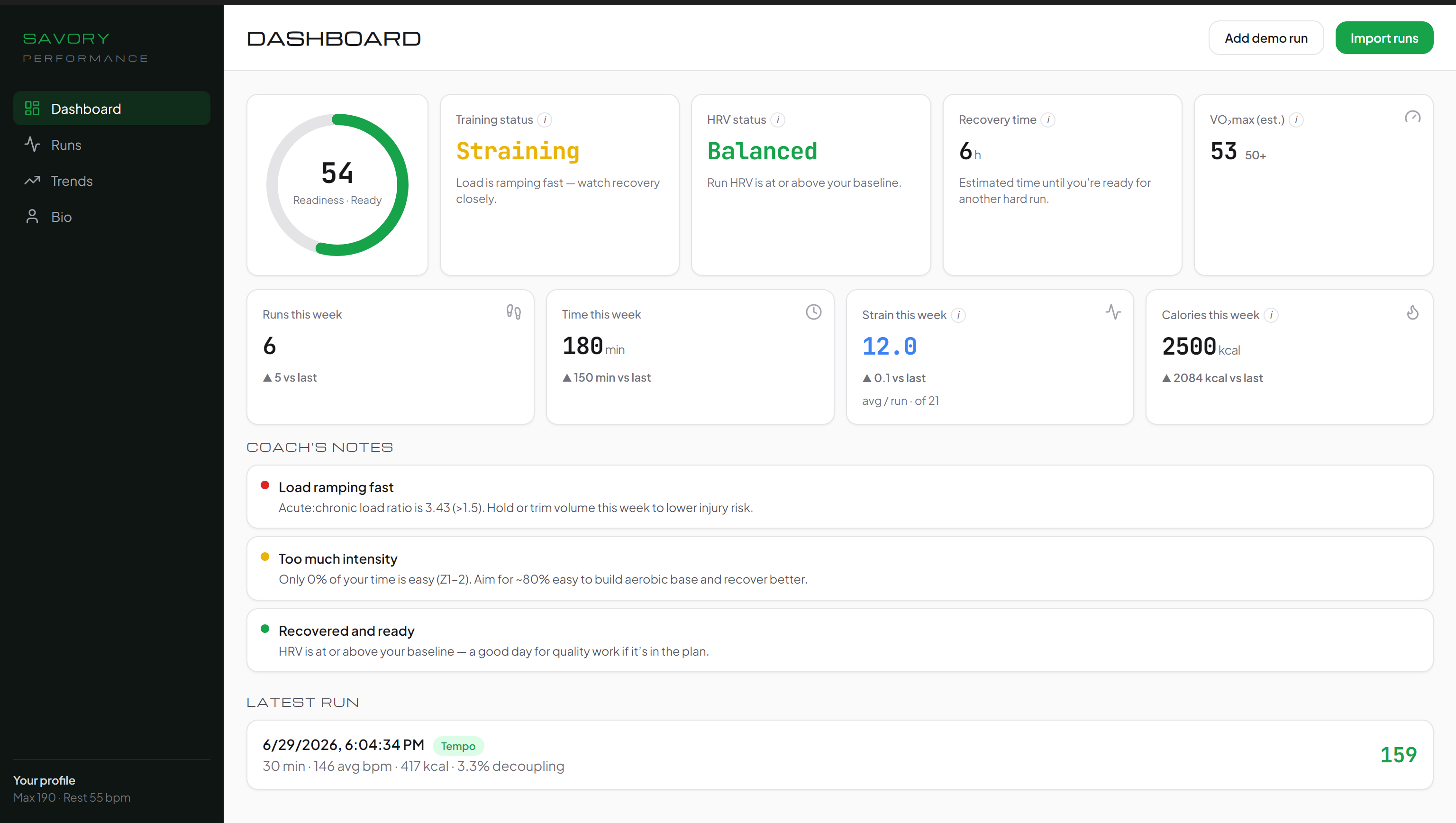
Most of the work so far has been software. While the parts were on the way, I built Savory Performance — a Windows desktop app (Electron + React) that reviews the runs the strap records. The model is deliberate and offline: the strap logs each run to onboard flash as a CSV, you plug it in over USB, the app imports it, and you sit down to read the analysis — no phone, no cloud, no account. The firmware is written for exactly this (log-and-download as a USB mass-storage device), and a simulator stands in for the sensor, so the whole pipeline — import → analyse → chart — already runs end to end without hardware.

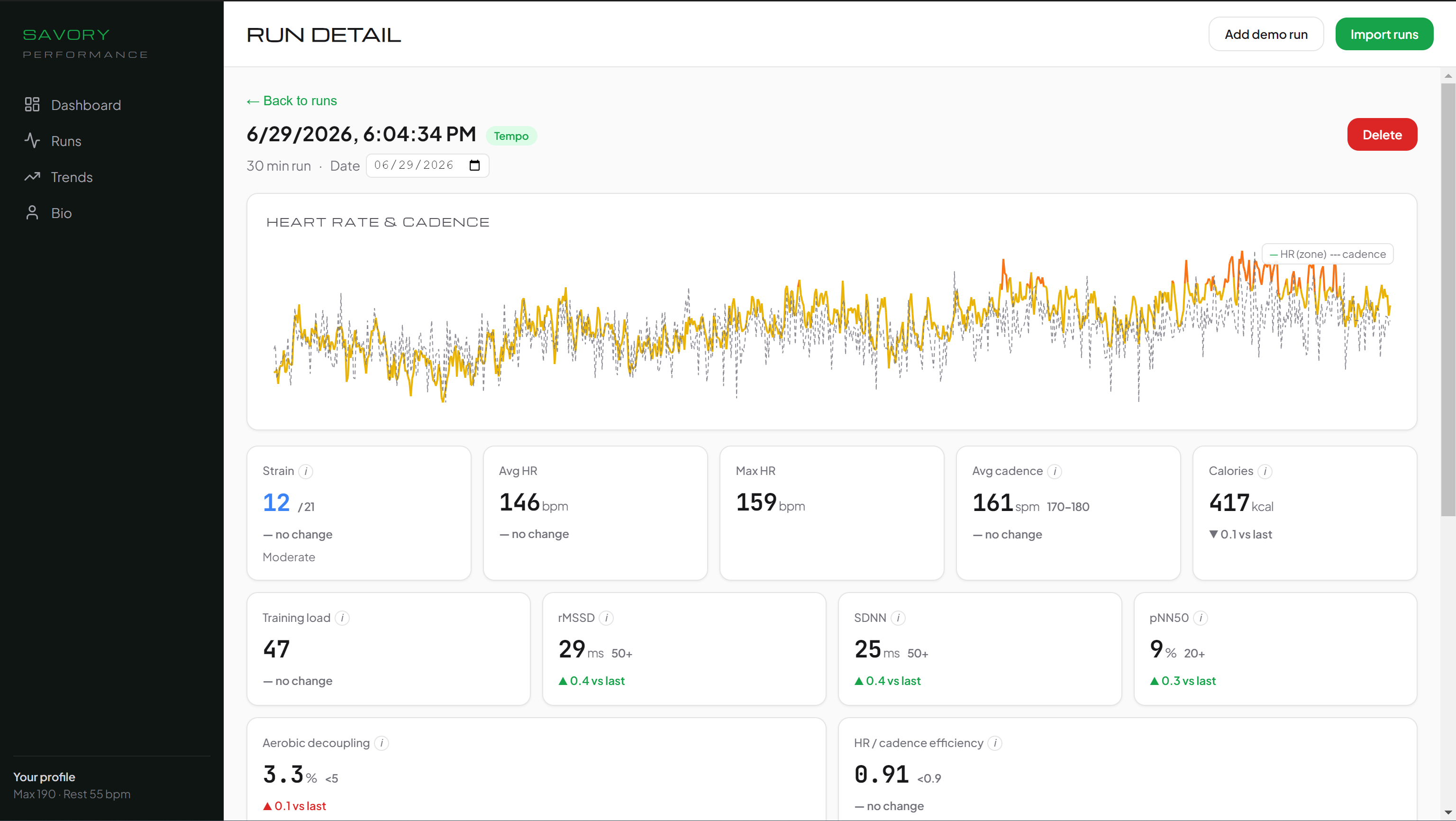
The analytics are a pure, unit-tested TypeScript core: HR zones, HRV (rMSSD, SDNN, pNN50), training load (Banister TRIMP) with an acute:chronic workload ratio, aerobic decoupling, cadence efficiency, an estimated VO₂max, calorie burn, and automatic run classification — plus higher-level status reads on top: a readiness ring, training-status and HRV-status, recovery time, and a 0–21 Strain score. Because the strap is worn for runs and not 24/7, every status is derived from runs alone, and a rule-based ‘coach’s notes’ engine turns it all into plain-English suggestions — no AI.

THE APP

Screenshots use simulated runs — no real strap data yet.

Savory Performance desktop dashboard — readiness ring, run-derived training/HRV status, recovery time, weekly stats, and coach's notes Savory Performance run detail — zone-colored heart-rate and cadence chart with Strain, HRV (rMSSD/SDNN/pNN50), decoupling and efficiency metrics

> build_status

[✓] Architecture & component selection locked
[✓] Bill of materials sourced
[✓] Desktop app built — import, analytics, dashboard, trends, run-vs-workout sessions, side-by-side compare, personal-best badges, gear/shoe tracking, weekly backups & dark mode (on simulated data)
[✓] Firmware written for USB log-and-download — logs each run to onboard flash, mounts as a drive
[✓] Beat detector validated & pre-tuned on the PC against reference heartbeat signals — HR robust to noise & motion, HRV timing dialed in — so board bring-up is confirmation, not guesswork
[✓] Parts received
[..] Solder XIAO headers & wire MAX30102 over I²C
[  ] Bring up firmware on the board — verify clean HR + RR on the serial monitor
[  ] Add IMU cadence detection; log a real run and import it into the app
[  ] Design custom CAD enclosure, strap-mount, and field-test on a run
PROGRESS: ▮▮▮▮▮▮▮▮▮▮▮▮▯▯▯▯▯▯▯▯ ~60% — PARTS IN HAND, WIRING THE BOARD

CORE COMPONENTS

  • Seeed XIAO nRF52840 Sense — nRF52840 MCU, BLE 5.0, onboard 6-axis IMU, LiPo charging, USB-C
  • MAX30102 — optical heart-rate sensor over I²C (also reads blood-oxygen / SpO₂)
  • 3.7V LiPo, JST 1.25mm — 300–500mAh (matched to the XIAO's 500mA charger)
  • Elastic chest strap — plain band, no built-in sensor
  • Custom CAD enclosure — strap-mounted pod, removable for charging
[ NO SIGNAL ]
img: wearable-strap.jpg
awaiting build photos

TAGS: nRF52840, Embedded Firmware, IMU / Sensor Fusion, Electron + React, Sports-Science Analytics

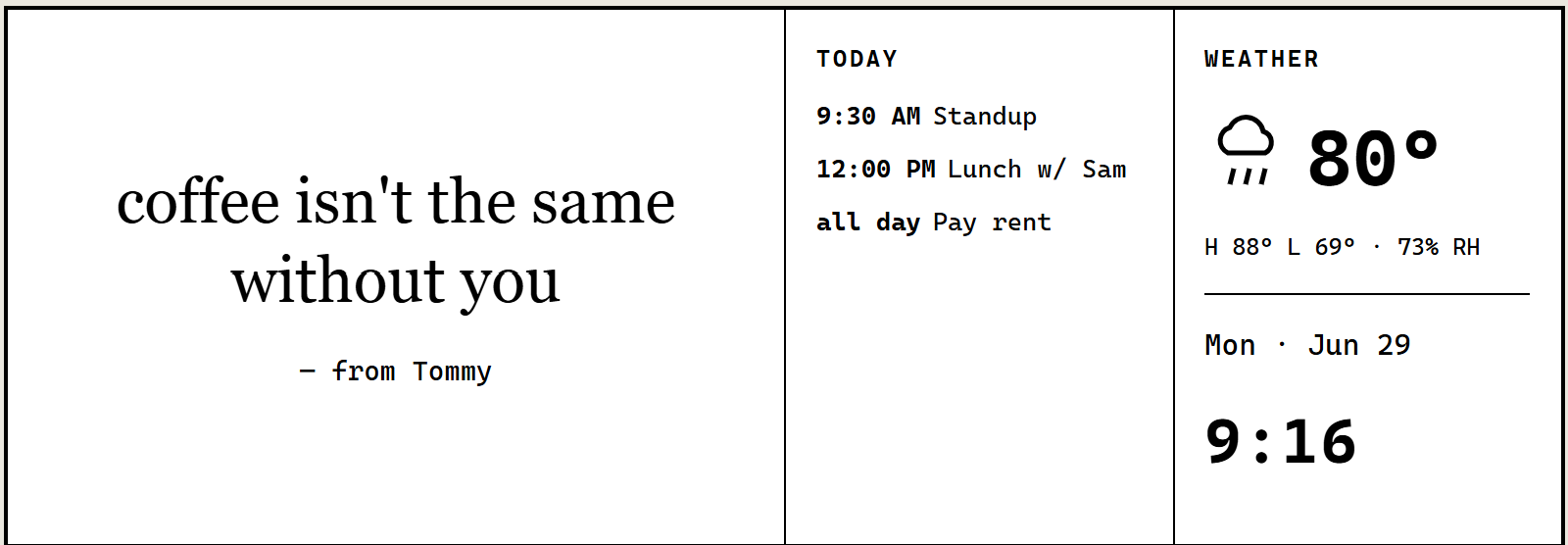
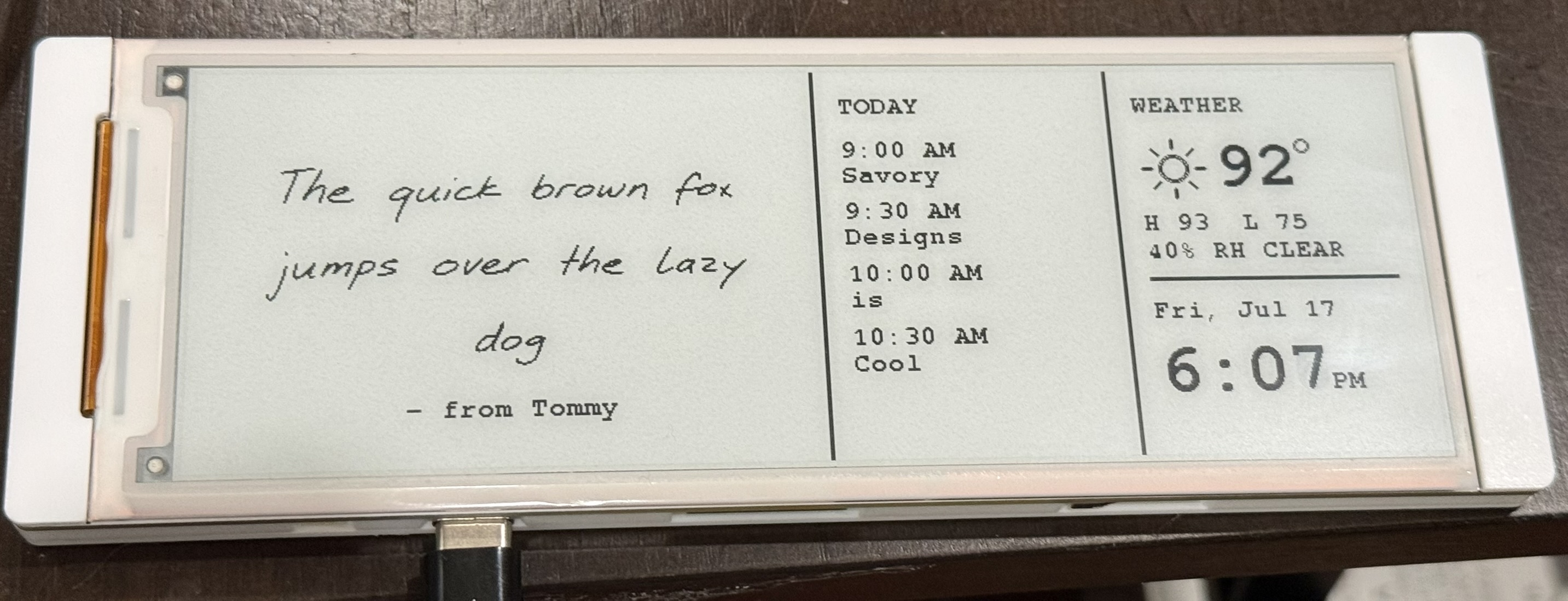
A little e-paper desk display for my girlfriend and me. We each send the other a short note — typed, turned into real handwriting, sketched by hand, or sent as a photo — from a private web portal, and it shows up on a paper-like screen on their desk next to the day's weather and calendar. More deliberate than a text, and nice for the stretches we spend apart.

It's built around the ELECROW CrowPanel 5.79″ — an all-in-one ESP32-S3 board with a 272×792 black-and-white e-paper panel. E-paper only draws power when the image changes, so a note can sit on the screen for days. The display is the piece still on the bench; the portal and backend that feed it are already built.

On the software side the system is already live. A private, password-protected web portal lets either of us send a note four ways — typed, drawn by hand, sent as a photo, or typed and rendered into real cursive by a neural-network handwriting model, so a quick message still looks handwritten. The backend pulls each person's local weather (Open-Meteo) and that day's events from Google Calendar, composes the note, agenda and weather into the 272×792 layout, and serves the finished image to the firmware over WiFi. A browser-based simulator renders that exact layout pixel-for-pixel, so I can design and test the whole display experience now and simply drop in the e-paper panel when it arrives.

> build_status

[✓] Architecture & hardware selected, board ordered
[✓] Web portal + backend built — send a typed note, real handwriting, a sketch, or a photo, with cached weather & calendar
[✓] Full-screen display modes and a "you've got mail" reveal — designed and tested in the browser simulator
[✓] Remote over-the-air updates wired up, with signed firmware — so the displays can be improved after they're sealed up
[✓] E-paper board received
[✓] Firmware bring-up — pull a note over WiFi and render it on the panel
[✓] Validate partial refresh across the dual-driver (SSD1683) seam
[..] Custom enclosure and a second unit — one for each desk
PROGRESS: ▮▮▮▮▮▮▮▮▮▮▮▮▮▮▮▮▮▯▯▯ ~85% — HARDWARE IN, BUILDING THE ENCLOSURE

CORE COMPONENTS

  • ELECROW CrowPanel 5.79″ — ESP32-S3, 272×792 B/W e-paper, dual SSD1683 driver
  • WiFi-polled firmware — pulls the latest note + weather, partial-refresh per region to avoid full-screen flashing
  • Web portal + backend — bookmarkable, password-protected page to send a typed note, real handwriting, a sketch, or a photo
  • Open-Meteo + calendar feed — each person's own local weather and the day's events
  • Full-screen modes + envelope reveal — on-device buttons cycle the note, weather and calendar; a new message arrives as a "you've got mail" envelope
  • Two units — one for each of us, each sending to the other

WHAT SHOWS UP

The e-ink display layout rendered in the simulator — a note beside the day's calendar agenda and local weather The assembled e-ink love note running — a handwritten note, the day's calendar agenda, weather, and time on the e-paper panel

TAGS: ESP32-S3, E-Paper, Embedded Firmware, WiFi, Full-Stack (Portal + Backend), CAD/Enclosure